> For the complete documentation index, see [llms.txt](https://voltbro.gitbook.io/en-vbcores/llms.txt). Markdown versions of documentation pages are available by appending `.md` to page URLs; this page is available as [Markdown](https://voltbro.gitbook.io/en-vbcores/vbcores-hardware/vbcore-vb32g4.md).
# VBCore VB32G4
VB32G4 v1.3
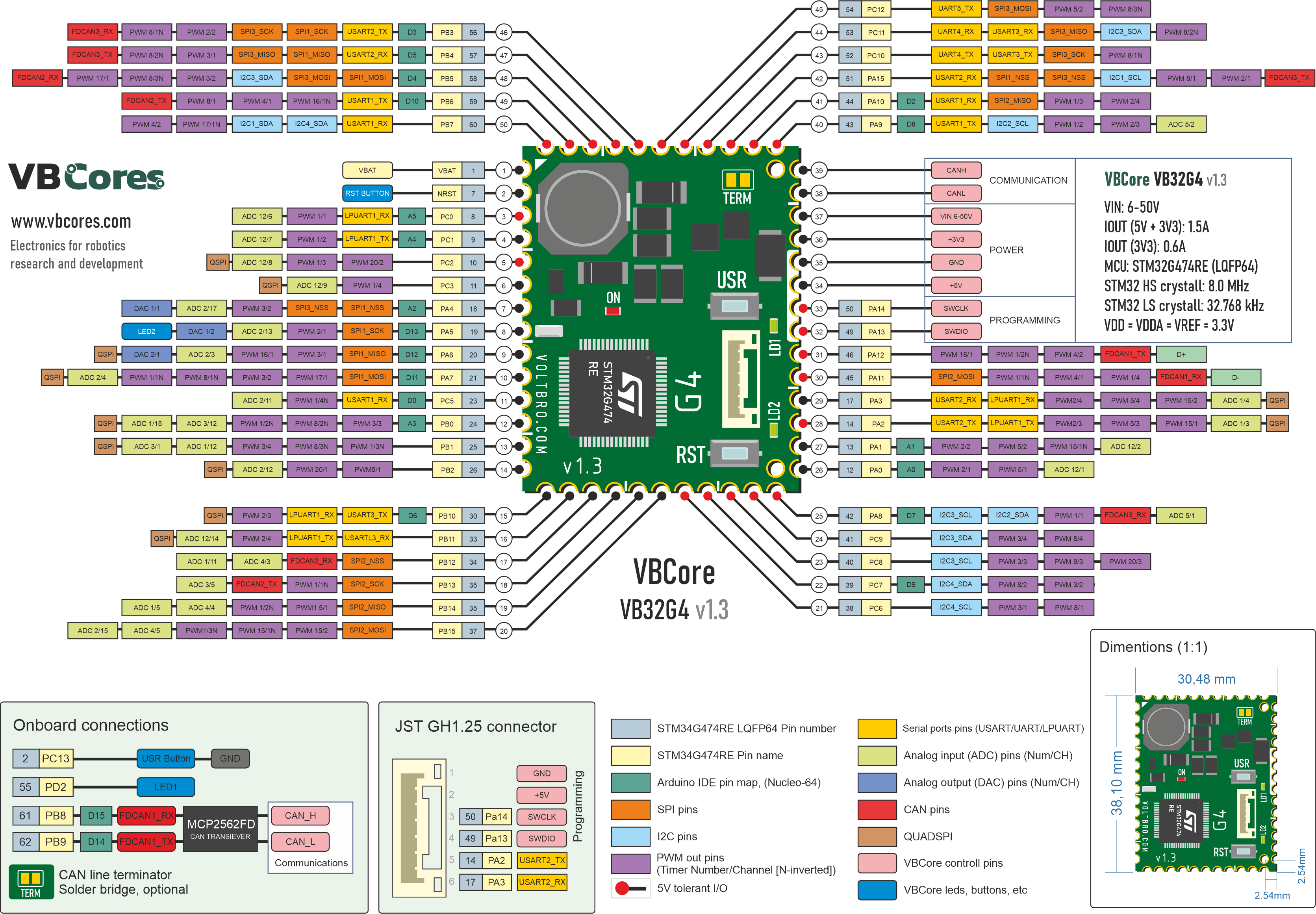
The main VBCore module based on the STM32G474RE microcontroller. The device embeds essentials for building various electronics hardware:
* **Logic** - advanced ARM® Cortex®-M4 MCU
* **Power** - efficient step-down converter with supply voltage up to 60V
* **Communication** - 8 Mbit FDCAN
\
All this is packaged into a tiny solder-on module together with necessary peripheral circuitry. Thanks to this device you can both free up time designing hardware and lower the cost of electronics in small to medium series production.\
The module can be programmed using traditional tools from the microcontroller manufacturer (STM32 CubeIDE and others) as well as Arduino IDE (STM32duino), taking advantage of the wide variety of available libraries.
* Current version: 1.3
* Operating voltage: 6-60V
* Output voltage: 5V, 3.3V: 1.5A (total), 3.3V up to 600 mA
* Microcontroller: STM32G474RE (LQFP64)
* Pins: 50 (14x11) with a 2.54mm pitch
VB32G4 datasheet
Print version:
{% file src="/files/cNeNAVHAcQK0dbmsrkm0" %}
STM32G474 Datasheet:
{% file src="/files/01lO5MwS04498JaaRhBf" %}
**Hints**:
* Make sure the module shares common ground with PCB it is soldered on: leaving ground pad floating and applying power supply voltage may lead to damage.
**Troubleshooting**:
* *The device flashes correctly, but does not work as intended*: check the state of **nswboot** option byte - it should be disabled.
* *The device can no longer be connected and programmed*: you probably haven't enabled debug pins in your firmware. Try connecting to the module during reset: press the reset button, click "connect" and release the button. After successful connection, do a full chip erase and fix the debug pins in your software.